Google Per Apna Business Kaise Promote Karen – Free & Practical Guide (2026)
Aaj ke digital yug me agar aap ek local business chala rahe ho – jaise kirana store, salon, gym, coaching center,Home stay, restaurant, real estate office ya koi service-based business – to sirf offline customers par depend rehna kaafi nahi hai. Aaj ka customer sabse pehle Google par search karta hai. Agar aapka business Google par dikh raha hai, to chances bahut badh jaate hain ki customer aapko call kare, message kare ya direct shop visit kare.
Isi liye sabse important sawaal ye hai – google per apna business kaise promote karen, wo bhi free me.
Personal Experience -:
Aaj se lagbhag 20 din pehle maine apne ek client ke new homestay “Delight Home Stay Near Mahakal Ujjain” ke liye Google Business Profile create kiya tha. Unka business bilkul new tha aur pehle Google par kahin bhi listed nahi tha.
Sirf Google Business Profile listing karne ke baad, unke homestay me 7 din ke andar 8–10 enquiries per week aani start ho gayi.
Ye enquiries sirf Google Search aur Google Maps se aa rahi thi, bina kisi paid ads ke.
Isse clearly pata chalta hai ki Google Business Profile kitna powerful tool hai.
Agar aap bhi apne business ko Google par list karke sahi tarike se optimize karte ho, to aap free me regular enquiries generate karke apne business ko grow kar sakte ho.
digital marketing services in Indore
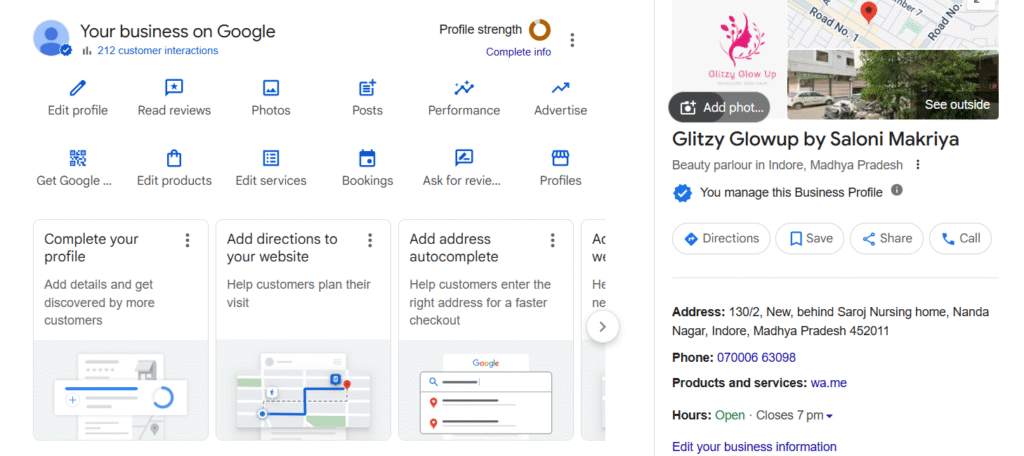
Google Business Profile Kya Hai Aur Kyun Important Hai.
Google Business Profile ek free platform hai jisse aap apne business ko Google Search aur Google Maps par list kar sakte ho. Jab koi customer Google par aapke service ya business type ka naam search karta hai, to aapka business profile search results me show hota hai.
Google Business Profile ka main fayda:
- Free listing
- Local customers tak direct reach
- Trust aur credibility build hoti hai
- Calls, messages aur website visits milte hain
Agar aapka profile properly optimized hai, to aap bina ads ke bhi leads generate kar sakte ho.
Jab maine Glitzy Glow Up by Saloni ke new salon ko Google Business Profile par list kiya, to listing ke kuch hi din baad unhe daily 2–3 calls aane start ho gaye.
Ye calls sirf Google Search aur Google Maps se aa rahi thi.
In calls ke through unhe naye clients mile, jinko unhone home services as a freelancer provide ki.
Dheere-dheere isi Google listing ki madad se unka client base ready ho gaya aur unke business ko stable growth milne lagi.
Google Business Profile Listing Kaise Banaye (Step-by-Step)
Bahut se log sochte hain ki listing banana difficult hota hai, lekin asal me ye process kaafi simple hai.
- Apne Google account se login karein.
- Google Business Profile website par jaayein
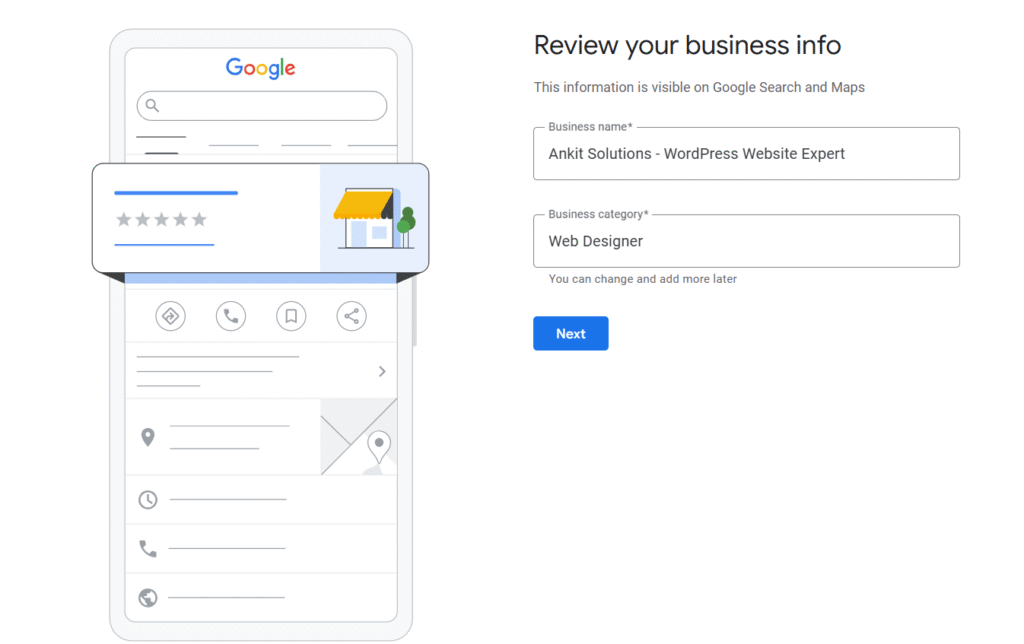
- Apna business name enter karein
- Business category select karein
- Address, phone number aur website add karein
- Verification ke liye request bhejein
Verification usually postcard, phone call ya email ke through hota hai.
Create Your Google Business Profile
Important Tip:
Business name me unnecessary keywords add na karein. Sirf apna real brand name hi use karein, warna profile suspend ho sakti hai.
Jab maine Glitzy Glow Up by Saloni ke liye Google Business Profile create kiya, to unka profile ek hi din me visible ho gaya aur maine phone number verification method se verification complete karwa diya.
Lekin shuru me unka phone number profile par show nahi ho raha tha. Is problem ko solve karne ke liye maine Google Support se contact kiya aur unhe proper details share ki — jaise correct business name, real phone number jo show karna tha, aur issue ka clear explanation.
Maine identity proof ke saath support ko email bhi kiya. Is process ke baad 4–5 din ke andar phone number profile par visible hone laga.
Is experience se mujhe samajh aaya ki agar verification ke baad bhi koi detail show na ho, to Google Support ke through issue resolve karwana possible hota hai.
Google Search Central guidelines
Google Par Free Business Promotion Kaise Kare
Sirf listing banana kaafi nahi hai. Aapko profile ko active rakhna hoga.
- Regular Photos Upload Karein
Shop ki photos, team ki photos, product images upload karein. - Weekly Google Posts
Offers, updates aur new services ke posts daalein. - Services & Products Add Karein
Har service ko detail ke saath add karein. - Business Description Optimize Karein
Apne description me local area aur services mention karein.
Jab maine Delight Home Stay Near Mahakal Ujjain aur Glitzy Glow Up by Saloni ke Google Business Profile par regularly weekly posts aur photos upload karna start kiya, tab mujhe clearly improvement dikha. Profiles par views badhne lage, customer actions increase hue aur overall engagement bhi better ho gaya.
Main offers, services aur real business photos regularly add karta tha, jisse customers ko business par trust hua. Iska result ye nikla ki dono businesses ko pehle se zyada calls aur enquiries milne lagi.
Ye experience mujhe ye samjhaata hai ki agar aap Google Business Profile par consistently posts aur photos upload karte ho, to aapki visibility badhti hai aur free me quality leads generate hoti hain.
Local Business Promotion Tips in Hindi
- NAP (Name, Address, Phone) sab jagah same rakhein
- Local keywords use karein jaise “Salon in Indore”
- Customers se genuine reviews maangein
- Reviews ka reply zaroor karein
Reviews Google ko signal dete hain ki aapka business trustworthy hai.
Jab maine Delight Home Stay Near Mahakal Ujjain ke owner ko Google reviews ki importance samjhai, to maine unhe clearly bola ki jo bhi guest stay complete kare, unse politely review zarur lene ki habit banayein. Maine unhe explain kiya ki jitne zyada genuine reviews aayenge, utna hi Google Business Profile ka trust build hoga.
Owner ne ye process seriously follow kiya aur har satisfied guest se review request karna start kar diya. Kuch hi time me profile par positive reviews badhne lage. Iska direct impact ye hua ki profile zyada trustworthy dikhne lagi aur enquiries me noticeable increase hua.
Google My Business Se Leads Kaise Laye
Agar aap chahte ho ki customers easily contact karein, to ye settings zaroor ON rakhein:
- Call button
- Message option
- WhatsApp link
Jitna easy contact hoga, utni zyada enquiries milengi.
Free Tools Jo Google Promotion Me Help Karte Hain
Aap kuch free tools ka use karke apni profile aur better bana sakte ho.
Canva – Posts aur banners design ke liye
(Canva ki madad se aap Apne Business ke Liye Free Me Offer ya Apne Business ke liye Post ko Create karke Download kar sakte ho. yaha aap jitne chahe image ko create kar sakte ho free me)
ChatGPT – Captions aur descriptions ke liye
(Chatgpt ki Madad se Aap Apne Post ka title & Description ready kar sakte ho jisse aapka Kafi jyada Samay bachega aur ye apko Professional way me sab kuch ready made content taiyar karke dega )
Ye tools beginners ke liye kaafi helpful hote hain.
Common Mistakes Jo Aapko Avoid Karni Chahiye
- Fake reviews banana
- Keyword stuffing
- Incomplete profile rakhna
- Long time tak profile inactive chhodna
FAQs
Q1. Kya Google Business Profile free hai?
Haan, bilkul free hai.
Q2. Result kab aata hai?
2–4 weeks me improvement dikhne lagta hai.
Q3. Kya bina website ke bhi promotion possible hai?
Haan, sirf Google Business Profile se bhi leads mil sakti hain.
Facebook Ads for local business guide
Conclusion
Agar aap seriously google per apna business kaise promote karen ye seekhna chahte ho, to Google Business Profile sabse best free option hai. Sahi tarike se listing banana, optimize karna aur regular update dena aapko long-term me strong results dega.
Agar aap apne business ke liye professional help chahte ho, to aap hamse contact kar sakte ho.